How to Build AI Tools and Automations Using Claude: The Prompt Engineering Story
By Jim Chetwode · 15 March 2026 · 12 min
Learn prompt engineering and how to build AI tools and automations with Claude in minutes. Includes real examples and frameworks for effective prompts.
Why Prompt Quality Matters More Than You Think
If you have spent any time working with large language models (LLMs) like Claude, ChatGPT, or others, you have probably noticed something simple but profound. Two people can ask the same AI the same question and get wildly different results. One person gets a useful, thoughtful answer. The other gets something generic and unhelpful.
The difference is almost never the AI itself.
It is the prompt.
A prompt is the instruction you give to an AI model. It is the foundation of everything that happens next. Get the prompt right, and the AI can do remarkable things in seconds. Get it wrong, and you waste time fixing mediocre outputs. This matters more than most people realise, especially as teams and businesses start building AI tools and automations.
This is not abstract theory. This is the practical, everyday reality of working with AI in real business settings.
What Makes a Prompt Good?
A good prompt has several key characteristics. These are not rules cast in stone, but they have proven themselves in real-world use.
Clarity
The AI needs to understand exactly what you want. Not almost understand. Not kind of understand. Exactly understand. Vague instructions produce vague results. Specific instructions produce specific results.
For example, "Write something about marketing" is vague. "Write a 300-word email to a plumbing business owner explaining why they need a local SEO strategy" is specific. The second prompt will always produce something more usable.
Context
Give the AI enough context to do the job well. What industry is this for? Who is the audience? What problem are we solving? Without context, the AI has to guess, and guessing leads to generic outputs.
Role Definition
Tell the AI what role to play. You are a sales expert. You are a technical writer. You are a business strategist. This simple instruction shapes the tone, depth, and angle of the response in ways that matter.
Output Format
Specify how you want the result. A bulleted list or a paragraph? A JSON object or plain text? Markdown or HTML? The AI can produce almost any format, but only if you ask for it clearly.
Examples
If you can give the AI one or two examples of what you want, it will follow that pattern. Few-shot prompting (showing examples) is more effective than zero-shot prompting (asking without examples) in almost every case.
The Prompt Power Tool: Teaching Through Competition
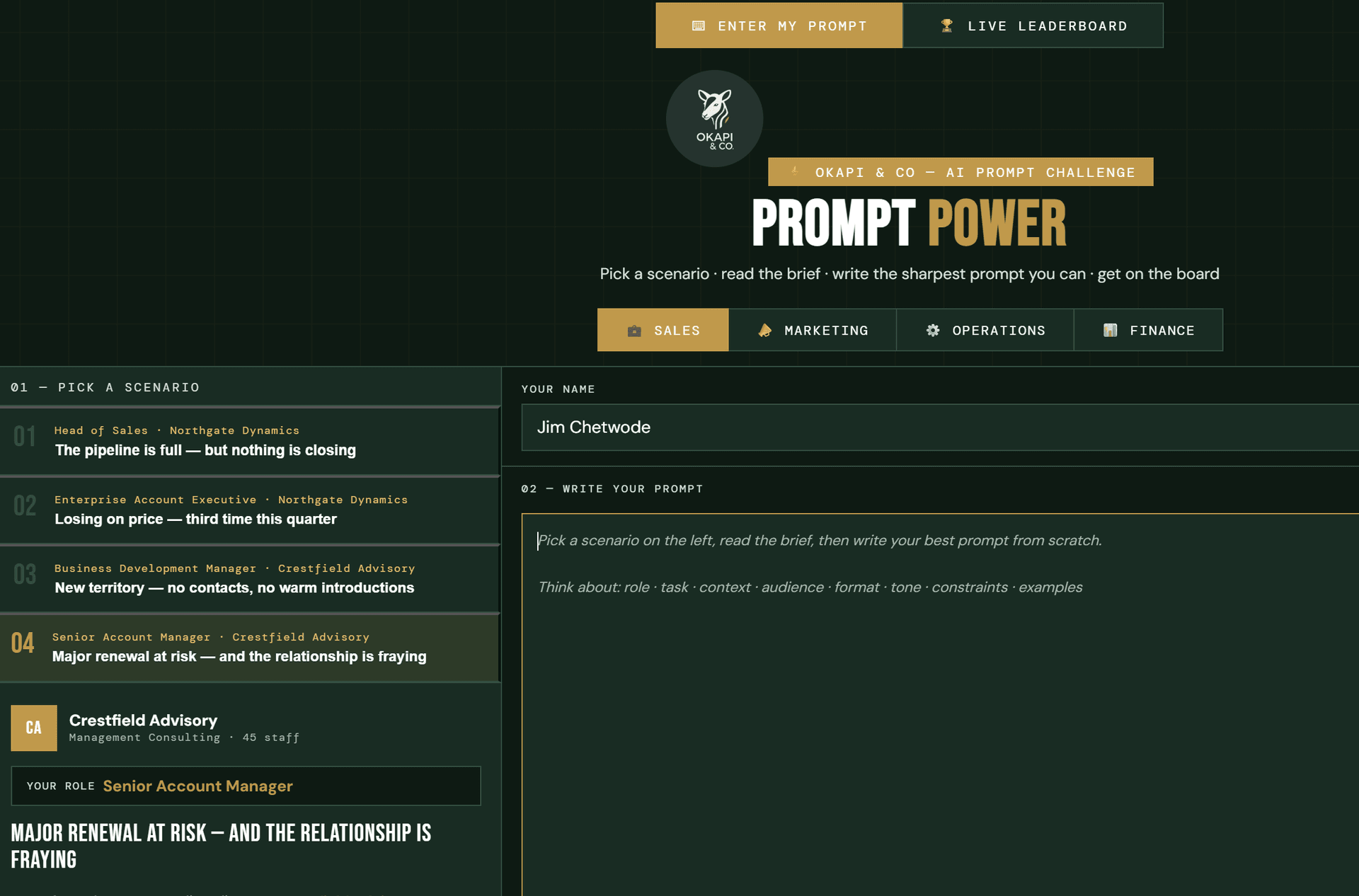
This is why we built the Prompt Power competition tool. It takes prompt engineering from theory into practice. It shows teams and individuals exactly how their prompts score against a rubric that measures all the characteristics above.
Here is how it works.
You pick a scenario. Maybe you are a sales manager writing an email to a client. Maybe you are a marketing director creating a product description. Maybe you are an operations lead asking an AI to help with a workflow.
You write your best prompt. As you type, the tool scores it in real time. The scoring rubric measures things that actually matter. Does it have clear instructions? Does it provide context? Does it specify the output format? Does it define a role? Does it include examples?
You get a score out of 1000. This score reflects the quality of your prompt, not the quality of your thinking or your writing skill. It is measurable feedback.
Then your score goes on the leaderboard. In a presentation or team event, this creates something interesting. It turns prompt engineering from a vague skill ("be better at writing instructions") into something visible and competitive. People see what works. They see what does not. They improve.
Why This Matters in Real Work
Prompt engineering is not a nice-to-have skill. It is becoming as essential as email or spreadsheets. Here is why.
Speed
A well-written prompt gets you the right answer in seconds. A badly written prompt wastes 10 minutes of back-and-forth refinement. Multiply that across a team and you lose hours every week.
Quality
A good prompt produces outputs you can use without heavy editing. A poor prompt produces outputs that need rework. This affects the quality of client work, internal documents, and everything else.
Cost
If you are using Claude through an API, you pay for tokens. A vague prompt might require five back-and-forth exchanges. A clear prompt gets it right the first time. That is a 5x cost difference.
Consistency
When teams write prompts badly, they get inconsistent results. One person's AI output looks nothing like another person's. With clear prompts, results are consistent and predictable.
AI Tool Building
When you build custom tools or automations with Claude, prompt engineering is the core skill. You are not writing code to solve the problem. You are writing instructions. The better those instructions, the better the tool works.
Building AI Tools and Automations with Claude: A Practical Approach
Now let us talk about building tools. This is where prompt engineering becomes part of something larger.
Many agencies and teams think you need to be a programmer to build custom AI tools. You do not. You need to be clear about what you want.
Here is the workflow for building an AI tool with Claude.
Step 1: Define the Problem
What is the tool supposed to do? Not "help with AI", but specifically. "Score a sales email on how well it targets the buyer's pain points." "Generate social media copy for a local dental practice." "Extract key information from a client brief and structure it into a proposal template."
Be specific. The more specific you are, the better the tool works.
Step 2: Write a Strong Prompt
This is the core. Write a prompt that tells Claude exactly what to do. Include role definition, context, examples, and expected output format. Test it. Refine it. Get it right.
This is not coding. It is clear writing. It is thinking through what information the tool needs and what output it should produce.
Step 3: Build the Interface
You can build a simple web interface in minutes using tools like Vercel, Next.js, and Claude's API. You do not need to be an expert. A basic form that takes input and shows Claude's output is sufficient.
The Prompt Power tool is a perfect example of this. It is simple. Someone fills in a field. The tool runs a prompt through Claude's API. Claude scores the prompt. The result appears on screen. That is it. No complex architecture. Just a clear problem, a good prompt, and a clean interface.
Step 4: Deploy and Iterate
Put the tool where your team can use it. Collect feedback. Refine the prompt based on what you learn. You will discover that tweaks to the prompt often have bigger impact than tweaks to the code.
Real Examples of Tools You Can Build in Minutes
Prompt engineering with Claude is powerful because Claude is powerful. You can build tools that used to require days of coding and technical setup in a couple of hours.
Scoring and Evaluation Tools
A rubric evaluator. A copywriting scorer. A proposal quality checker. Any situation where you have a clear standard and you want to measure output against it. The tool runs the input through Claude with a detailed rubric prompt and returns a score.
Content Generation Tools
Product description writers. Email generators. Social media post creators. Job description builders. These work because Claude can follow detailed instructions about tone, format, and audience.
Extraction and Transformation Tools
Tools that take messy input (a client call transcript, a poorly written brief, a PDF of notes) and structure it into something usable (a formatted proposal, a structured dataset, a clarity summary).
Analysis and Insight Tools
Tools that take customer feedback, sales calls, or support tickets and surface patterns, sentiment, or actionable insights.
Customer-Facing Tools
Interactive tools that you can offer to your clients or prospects. A quiz that generates a custom recommendation. An audit tool that scores their website or marketing. A calculator that helps them understand a concept.
All of these can be built quickly because the heavy lifting is done by Claude. You write clear instructions. Claude does the work.
Adding AI Tool Building to Your Service Offering
If you are an agency or consultant, this is an opportunity worth considering. Your clients likely have problems that AI tools could solve, but they do not have the technical expertise to build them. You do.
This is a natural service to add to what you already offer.
You can build tools that score or evaluate client work, automate content creation for specific use cases, extract and structure data, provide quick assessments, or engage customers in interactive experiences.
The margin is good because the time investment is low. You are not building complex software. You are writing prompts and simple interfaces. The value to your clients is high because the tools solve real problems and save time.
This is a service many agencies are not yet offering. It is an opportunity to differentiate and create a new revenue stream. It is also an opportunity to show clients exactly what AI can do for their business, in a tangible, working tool they can use.
The Prompt Guide: Learning the Foundations
The foundations of good prompt engineering are not mysterious. They are learnable. They are practical. They follow from understanding how LLMs work and what they respond to.
A prompt guide documents these foundations. It shows examples of strong prompts and weak prompts. It explains why certain approaches work and others do not. It gives frameworks for thinking about prompt design.
If your team is going to build AI tools and automations, a shared understanding of these principles is essential. Without it, you will see inconsistent results, wasted time, and frustration. With it, you will see clarity, speed, and quality.
The Bottom Line
Prompt engineering is not hype. It is not a passing fad. It is a foundational skill for anyone working with AI. And it is surprisingly learnable.
Start small. Write one prompt clearly. Test it. See how it performs. Refine it. Understand why certain phrases and structures work better than others. Teach your team.
Then, when you are ready, build something. A scoring tool. A content generator. A client-facing assessment. Any tool that takes a clear input and produces a useful output.
You will be amazed at what you can do in a couple of hours.
And your clients will be amazed at what you built for them.
Get Started
Try the Prompt Power tool. Pick a scenario you care about. Write your best prompt. See your score. Notice what the rubric rewards. Write another prompt and watch it improve. That is the fastest way to understand what makes a prompt good.
Then, if you want to discuss building a custom AI tool for your business, book a call with us. We can help you build something that works.
Tagged: Guide, Tutorial.

Jim Chetwode
Founder, Okapi & Co · Shaftesbury, Dorset
Thirty years in digital marketing, now spent on how businesses get found in Google and cited by AI assistants. Chairman of the Shaftesbury and District Chamber of Commerce, Dorset Ambassador, and the person who runs the AI workshops.