A morning by the sea, teaching an NHS comms team to stop copying and pasting
By Jim Chetwode · 30 September 2026 · 7 min read
Eleven people, one art deco room on Bournemouth beach, and a lot of Microsoft Copilot. What we taught an NHS hospital communications team, and the prompts we left behind.
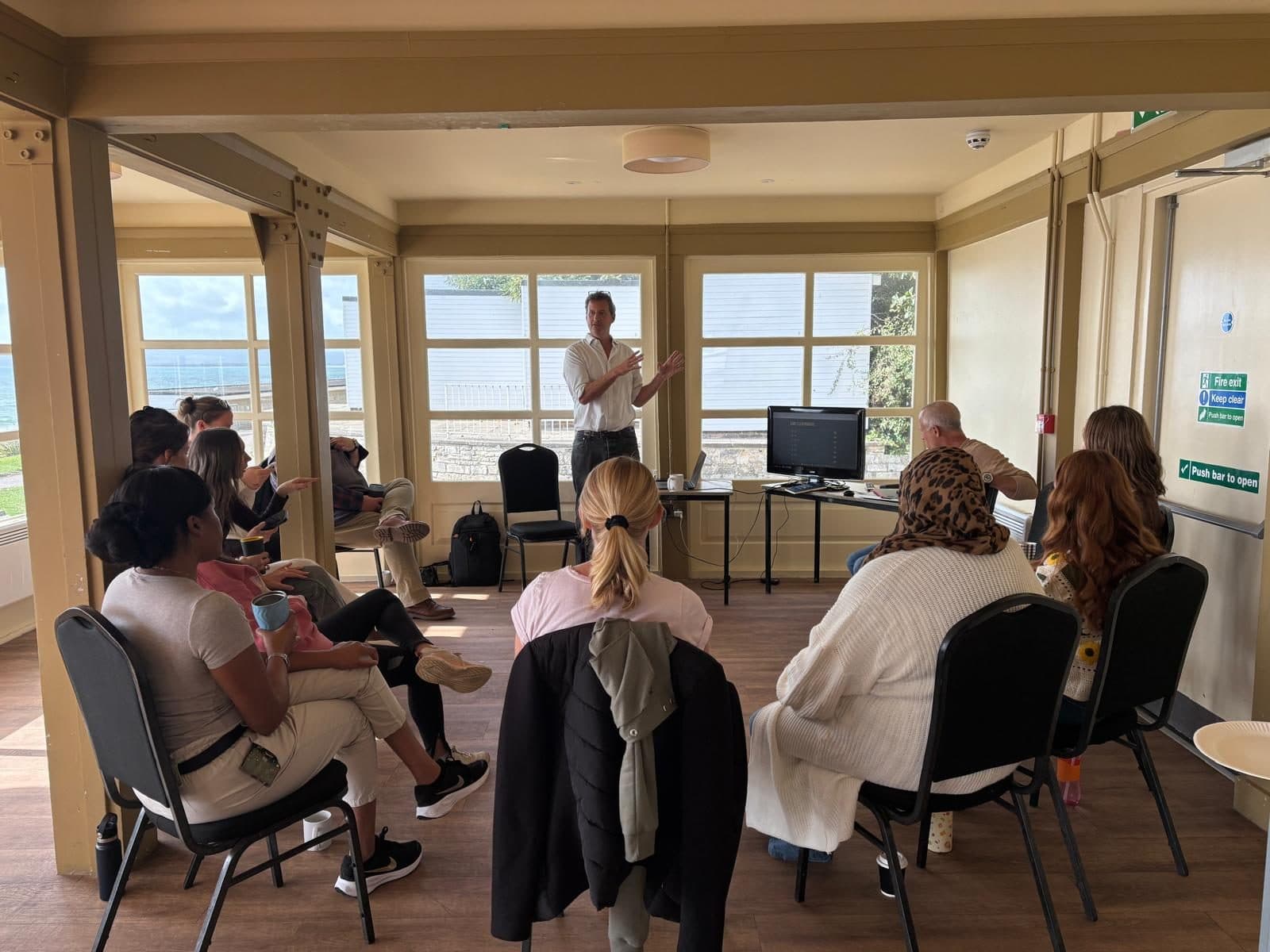
We spent this morning in the Branksome Dene Room on Bournemouth seafront, a 1920s art deco pavilion with the sea filling the windows, teaching eleven people from an NHS hospital communications team how to get Microsoft Copilot doing the parts of their job they do not enjoy.
It is a good room for it. Nobody checks their phone when there is a view like that, and nobody pretends to already know everything either.
In this note
- Why now
- Two Copilots, and it matters which one you have
- Where the copying and pasting actually goes
- The four-part prompt
- The rules before the tricks
- A competition, and a score of 1,000
- The thing they took away
- Training for your team
Why now
This is not a team going looking for AI. AI has arrived on their desks.
In June, NHS England announced that more than 500,000 staff would get Microsoft 365 Copilot by October 2026. That followed a trial across 90 NHS organisations involving more than 30,000 people, which found an average saving of 43 minutes per person per day. That is roughly five working weeks a year, each.
The number is impressive and it is also slightly beside the point. A licence lands in your Microsoft account whether or not anybody has shown you what to do with it. Most people open it once, ask it something vague, get something bland back, and quietly go back to doing it the long way. That is what the morning was for.
We were honest about the anxiety in the room, because it is real and it deserves an answer rather than a slogan. Copilot does the assembling. You do the judging. It has no idea what your board will react to, what a worried patient will read into a sentence, or which three words in a press release will end up as the headline. That judgement is the job. The blank page and the inbox scroll are not.
Two Copilots, and it matters which one you have
This caused more confusion than anything else, and it is worth spelling out because it explains most disappointing first attempts.
There are two different things both called Copilot.
Copilot Chat is the chat window. Everyone on NHSmail has it. You can ask it questions, paste text in, get it rewritten, and have it search the web. What it cannot do is see your inbox, your calendar or your files on its own.
Microsoft 365 Copilot, the licensed version, is built into Outlook, Teams, Word, Excel and PowerPoint. It does everything Chat does, and it can also read your own mailbox, your calendar and the files you already have access to. This is the one being rolled out trust by trust.
If someone has tried asking Copilot to summarise their inbox and been told it cannot, they almost certainly had Chat rather than the licensed version. Nothing was broken. They were using the wrong door.
Both versions keep your prompts inside the NHS tenant and neither uses what you type to train Microsoft's models. The green shield icon is the thing to look for.
Where the copying and pasting actually goes
The bulk of the morning was a normal working day, hour by hour, with the dull parts handed over. Not five hours of AI wizardry. Five to fifteen minutes here and there, where Copilot assembles and the person checks and finishes.
The moments that got the biggest reaction:
The morning brief instead of the inbox scroll. Ask Copilot to summarise everything since 5pm yesterday, grouped into needs a reply today, for information, and can wait. Ten minutes of reading becomes two minutes of scanning.
Meeting prep in three prompts. What was agreed last time, what has changed since, then a one-page briefing note in plain English under 400 words. Copilot shows you which emails and files it used, and you open a couple to check.
One set of notes, every channel. From a single press release: a 60-word intranet post, three social captions written for their own platforms, and a two-line email to the team. This is the copy-and-paste tax that comms teams pay every week, and it is exactly what these tools are good at.
A report turned into a first-draft deck. Not a finished presentation, and the slide count is often wrong. But twenty minutes of editing beats two hours of building from a blank template.
Minutes and actions written while you were still talking. With transcription agreed and switched on, a Teams recap gives you the summary, the decisions and who agreed to do what. Our favourite trick of the day: ask it to mark anything it is unsure about with [CHECK], so you know exactly where to look.
We left the team with a written set of these prompts to keep, because a prompt you have to remember is a prompt you will not use.
The four-part prompt
Most disappointing answers come from one-line requests. We showed the difference live: "write an email about visiting hours" against the full version. Same tool, completely different output.
| Part | What it does | Example |
|---|---|---|
| Goal | What you actually want | "Write a staff email announcing the new visiting hours." |
| Context | Who it is for, and why | "For ward staff who are busy and may be annoyed by the change." |
| Source | What to base it on | "Use the decision in the visiting policy document. Do not add anything that is not in it." |
| Format | How it should look | "Under 150 words, warm but direct, with a date and a contact for questions." |
The fourth line is the one people skip, and it is the one that saves the rewrite.
The rules before the tricks
We did the guardrails early, because a team that knows where the line is uses the tool with far more confidence than a team quietly worrying they are about to do something wrong.
What is fine: drafting, rewriting and summarising non-sensitive documents, reading long policies, turning agreed meeting transcripts into actions, researching public information, and working on files you already have permission to open.
What is not: typing patient-identifiable or staff-identifiable information into a chat window, anything clinical, anything involving safeguarding, legal or incident reports, pasting work material into a personal or free AI account, and sending anything out without a person reading it first.
Two points we made firmly. Your trust's own information governance policy beats anything said in a training room, and if you are unsure the people to ask are your IG team, your Data Protection Officer or your Caldicott Guardian. NHS England publishes information governance guidance and a template DPIA for Copilot, reviewed with the Information Commissioner's Office and the National Data Guardian, which is the document your IG team will be working from.
The other point is about accountability, and it reassures managers more than any feature does. Nothing changes about who is responsible for what goes out. Your name is still on the email, the post and the paper. Read it as though you wrote it, because as far as everyone else is concerned, you did.
A competition, and a score of 1,000
Somewhere after the second coffee we ran the Okapi Prompt Tools challenge, which scores how well you brief an AI on a realistic task. It turns an abstract skill into something you can be competitive about, and NHS comms teams, it turns out, are quite competitive.
The top score of the morning was 1,000. Genuinely impressive, and more to the point, the person who got it did so by doing the thing we had spent the morning describing: giving it proper context and then refining the answer rather than accepting the first one.
The thing they took away
The feedback was generous, but the line that came back most was not about a feature. It was this.
Have a conversation with it. Do not take the first answer and walk away.
Say "shorter". Say "less formal". Say "add a line thanking them". Say "that is not quite our tone, here is something I wrote that worked". Each reply builds on the last, and while you are teaching it what good looks like for your organisation, you are learning what the tool can and cannot do. Nobody gets it right first go, and the people who get the most out of these tools are not the ones with the cleverest opening prompt. They are the ones who keep going for three more messages.
The other thing worth repeating, because it is the actual point of all of this: none of it is about doing less work. It is about spending less of your week on the assembling, and more of it on the parts of the job you took it for.
Training for your team
We run this kind of session for teams who have been handed a tool and not much else, and for individuals who would rather learn it properly in an hour than pick it up badly over six months.
- Team training, like this one, built around your actual workflows rather than a generic syllabus. We look at what your week involves first, then teach against that.
- One to one, for anyone who wants to go deeper, or who would rather ask their basic questions without an audience.
- Any of the main tools: Microsoft Copilot, ChatGPT or Claude. We use all three daily and have no interest in selling you the wrong one.
It works in the public sector, in a professional practice or in a five-person business, because the problem is the same everywhere. The tool is on the desk. Nobody has shown anyone what good looks like.
Tagged: AI training, Copilot, NHS, Workshops.

Jim Chetwode
Founder, Okapi & Co · Shaftesbury, Dorset
Thirty years in digital marketing, now spent on how businesses get found in Google and cited by AI assistants. Chairman of the Shaftesbury and District Chamber of Commerce, Dorset Ambassador, and the person who runs the AI workshops.