
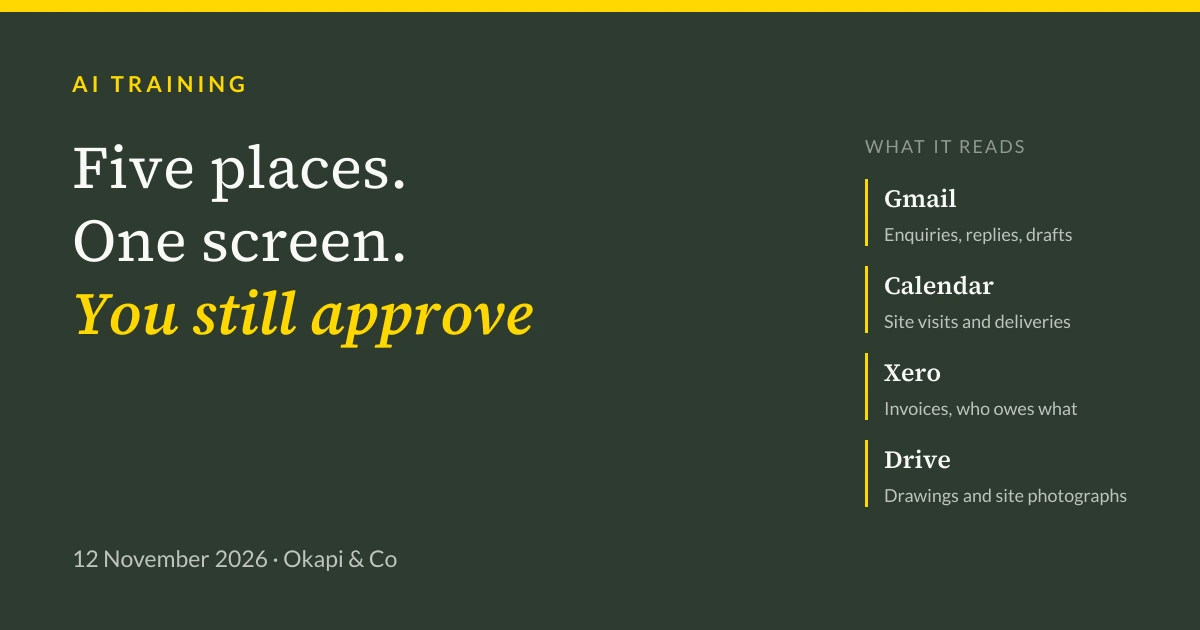
We built a working dashboard for a building firm that reads its email, diary, accounts and files, spots what needs doing and drafts the next step. Here is what it does, how you would build one, and the honest answer on whether it is safe.
A builder's week lives in five places. Email, for new enquiries and suppliers and customers asking whether there is any news. The diary, for site visits and deliveries and building control. Xero, for invoices and stage payments and who still owes what. Drive, for drawings and permissions and several hundred site photographs. And their own head, at eleven at night, for everything else.
Things slip through the gaps. Usually money.
At the Hinton Workspace Business Expo on Thursday morning, Jim spent twenty minutes on what happens if one screen reads all of it and tells you what to do next. This is that talk, written down.
What it actually does
The dashboard reads four tools the business already pays for: Gmail, Google Calendar, Xero and Drive. Nothing is migrated and nothing new has to be learned. The connectors read across them, and the screen shows the business in one place.
Across the top, four numbers. What is in the pipeline, what is booked and on site, what is owed, and what is overdue. Underneath, every job as a card moving left to right: enquiry, site visit, quoting, quote sent, booked, on site. Each card carries the customer, the job and the money.
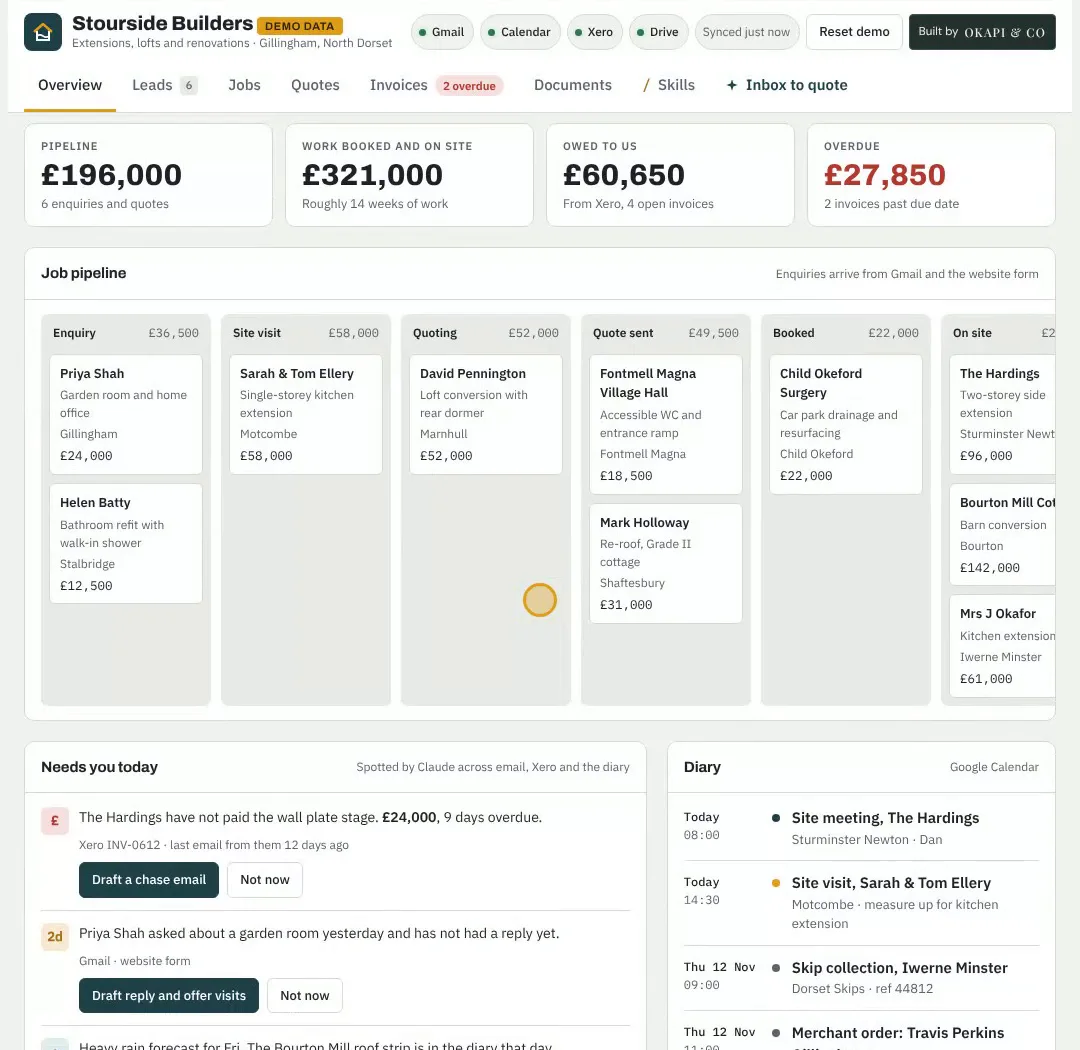
Then the part that earns its keep, a panel headed Needs you today. Not a list of everything. A short list of the things that will cost you if you leave them.
On the demo, three things sat in it. An invoice for a wall plate stage, nine days overdue, matched from Xero against the job. An enquiry about a garden room that had been sitting unanswered since the day before. And heavy rain forecast on a Friday with a roof strip in the diary.
Each one came with a button. Draft a chase email. Draft a reply and offer two site visit slots. Move the roof strip to the next dry day.
Click the chaser and you get an email written in the owner's own voice, with the invoice attached, sitting as a draft. Not sent. There is a second button that says make it firmer, which reliably gets a laugh in a room full of builders, and which still does not send anything.
From an email to a priced quote in about a minute
The second demo starts with a customer email. A hundred and fifteen words about a single-storey kitchen extension, bifold doors, a couple of roof lanterns, planning already granted.
Claude reads it and works through the steps on screen. It pulls out the customer, the address, the size of the job, the budget and the timing. It checks whether they are already in the system. It finds two site visit slots in the actual diary. It prices a draft quote off the firm's own rate card, ten lines, VAT included. Then it writes the reply in the owner's tone of voice and saves it as a draft.
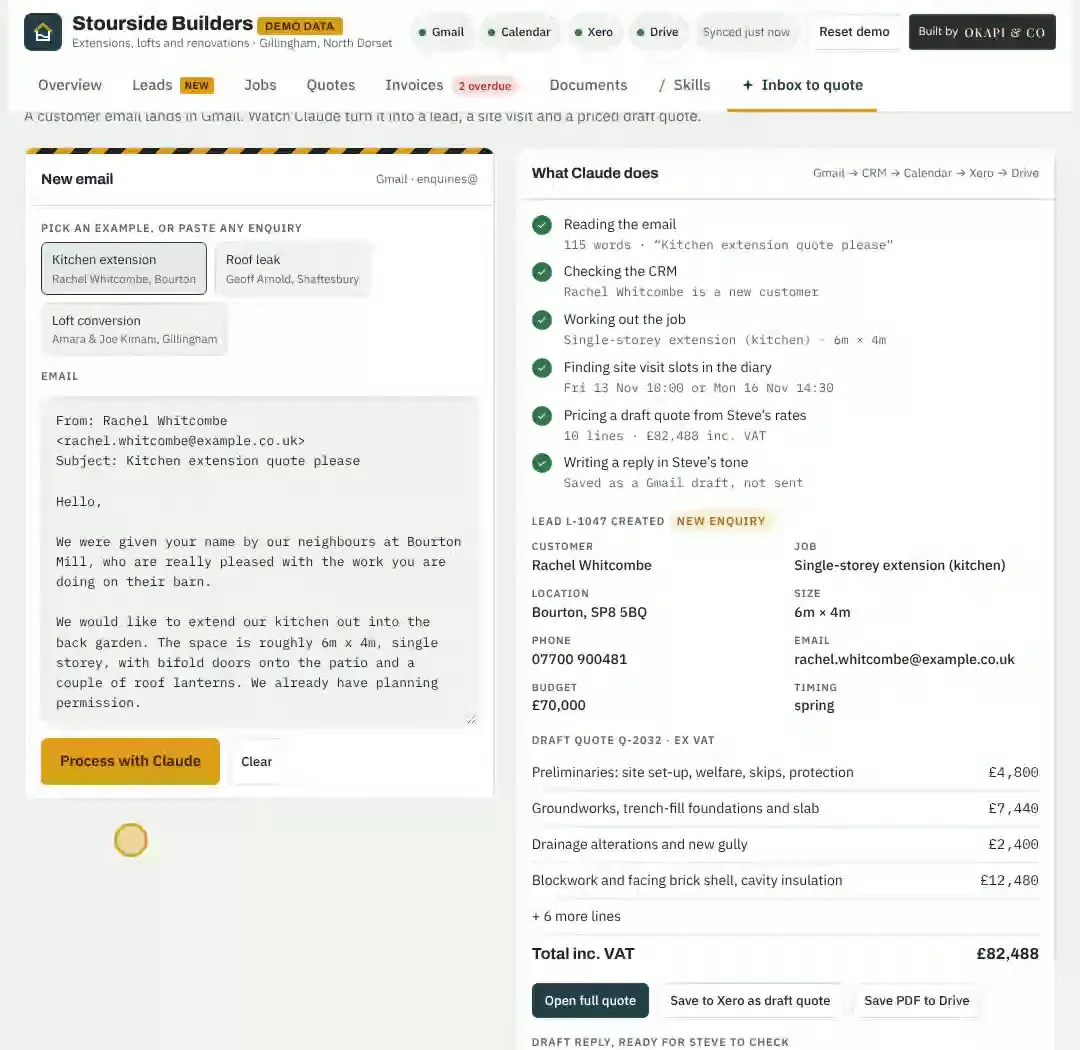
The quote came to a little over eighty-two thousand against a seventy thousand budget, and the draft reply said so plainly rather than hiding it. That matters more than the speed. A tool that quietly buries the awkward bit is worse than no tool.
Every figure in all of this is made up, which brings us to the honest part.
Stourside Builders does not exist
The firm in the demo is invented. The customers, the jobs and the numbers are invented. That was deliberate, and it is the whole reason the demo could be shown at all: we cannot put a real client's email and accounts on a screen in a room of eighty people.
Our own board is real. We use it every day. It reads our email, updates itself, writes proposals, raises invoices and is connected to Xero. It is also full of client data, which is exactly why it stayed shut.
If someone shows you a dashboard full of convincing real-looking client detail at an event, that is worth a question or two.
The useful idea: processes first, then a brain, then a tool
The thing worth taking away is not the dashboard. It is the order you build in.
Start with a process you already have. Not a feature you fancy. The job you hate most, which for most firms is chasing invoices, writing quotes or working out what today actually looks like.
Write that process down as instructions. This is the step people skip. How do you decide a chaser is due? What tone do you use with a customer who always pays late versus one who never has? What goes in a quote before you will send it? Written down, that is a brain: the thing that makes the output yours rather than generic.
Then save it as a skill. A skill is a saved set of instructions you call with one short command. On the demo there were six:
/morning-briefreads the diary, the overnight email and Xero, and writes the day in plain English/chase-late-payersdrafts a chaser for every overdue invoice, with the tone matched to that customer/cash-forecastlooks four weeks ahead at money in and out, and warns before it gets tight/site-visit-packgathers what to measure, ask and photograph from the customer's own emails/job-updatewrites a friendly weekly progress email from the site photos/review-requestsends a thank-you and asks for a review once the final payment clears
Each one does the job the same way every time, and anyone can write one in plain English. That consistency is the point. A prompt you retype from memory gets slightly different results depending on the morning you are having.
Then, and only then, the screen. Once you have a handful of skills you genuinely use, a dashboard is just somewhere to put them, and the board or CRM grows out of the processes rather than being bought and bolted on. Most firms get this backwards, buy the tool first, and end up with another system nobody updates.
Is it safe to give AI your email and your accounts?
This is the question every single time, and the answer is yes, if you set it up properly.
The one rule. Customer data goes on a Team or Enterprise plan. On the personal plans there is no data processing contract with your business at all. On a business plan you are the data controller, Anthropic is your processor, a Data Processing Addendum comes built in, and your data is not used for training by default. If you are a sole trader trying it out on a personal plan, that is fine for your own notes. The moment customer emails or invoices go in, move.
Connect only what is needed. Read-only where you can. Our own Xero connection reads invoices and contacts and cannot change or pay anything. Leave HR, health and personnel folders out of it entirely.
Keep a person on the send button. The real risk is prompt injection: hidden instructions buried inside an email that try to make the tool do something it should not. Nobody can block that completely yet, and anyone who tells you otherwise is selling something. That is precisely why every email, quote and chaser in the demo stops as a draft.
Alongside that: do a short Data Protection Impact Assessment, since the ICO lists new uses of AI as a trigger and two pages is genuinely enough. Say in your privacy notice that you use AI tools. Add Anthropic to your processor records next to Xero and Google. Turn on two-step login everywhere, because your connectors are only as safe as those accounts. And know that a reportable breach has to reach the ICO within seventy-two hours.
This is general information rather than legal advice, and it was checked against Anthropic's published terms, ICO guidance and Xero's developer terms on 12 November 2026.
The deck
The whole talk, including the plan comparison, the eight steps and the sources, is free to download. The speaker notes are still in it, so it reads as a document rather than a set of headings.
Where to start
Pick the job you hate most. Get the plan right before you connect anything. Connect one tool, not five. Build one skill and use it every day for a month before you add the next.
That is a far less exciting answer than a dashboard, and it is the one that works.
If you would like a look at what this would mean for your business, have a word with us or see what our AI training covers. If you would rather learn it alongside other local firms, that is what our workshops are for.
Tagged: Guide, Claude, AI agents, Automation.

Jim Chetwode
Founder, Okapi & Co · Shaftesbury, Dorset
Thirty years in digital marketing, now spent on how businesses get found in Google and cited by AI assistants. Chairman of the Shaftesbury and District Chamber of Commerce, Dorset Ambassador, and the person who runs the AI workshops.